
Question

Did Arris kill all the links to G34 documentation?

  • March 29, 2026
  • 3 replies
  • 4 views

3 replies

Forum|alt.badge.img+42

The link is working correctly, and we recommend that you try accessing it again. Additionally, based on your product selection (G34/G36), you can change the Wi‑Fi channels using the Surfboard Central app. Please refer to the link below for step-by-step instructions on how to do so

https://arris.my.salesforce-sites.com/consumers/articles/knowledge/SURFboard-Central-Changing-the-Wi-Fi-Channel


Forum|alt.badge.img+1
  • Author
  • The Many
  • April 1, 2026

Thank you. I have been able to select a channel, but the G34 still does not perform as well as my 2013 Apple Extreme router which I’d run in conjunction with your Surfboard SB6121.  How does selecting a channel outperform the auto select setting, wouldn’t the G34 scan and select the least congested and outperform my manual choice?

The app only allows channel selection on 5g, the 2.5 button cannot be selected. Is that because the 2 bands are automatically blended?  Thank you.


Forum|alt.badge.img+1
  • Author
  • The Many
  • April 1, 2026

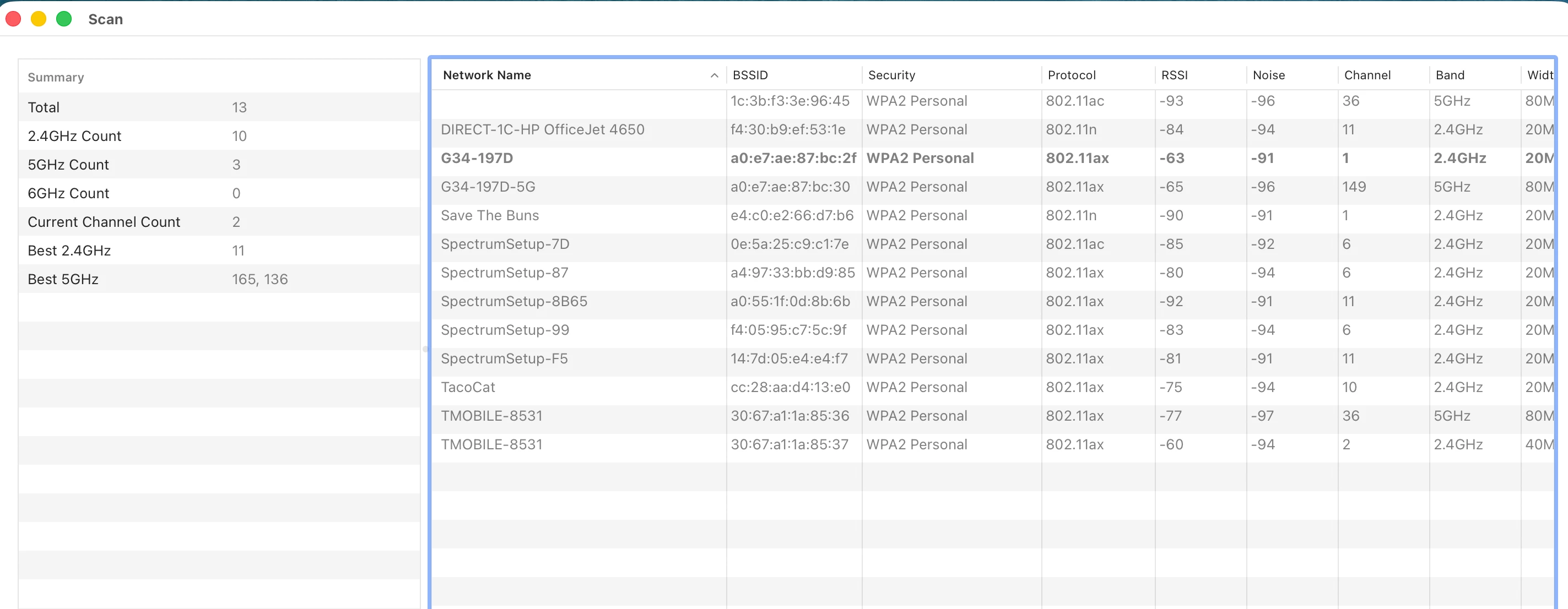
On my Mac I have Wireless Diagnostics which produced this result. My G34 is in bold and shows I’m using 2.4 GHz as a channel though as mentioned the 2.4 GHz button wasn’t available to me on the app.