Question

G54 – Creating Dedicated SSID for IoT's

  • December 17, 2025
  • 6 replies
  • 54 views

Forum|alt.badge.img

Hello,

I have an Arris G54 Gateway that runs about 30 wired and WiFi devices through a managed switch. Everything is working well, but I am trying to add a new WiFi touchscreen that is supposed to connect to the existing connected internet interface device with a LAN IP for a security alarm system. The touchscreen firmware works via 2 connections: A basic WiFi connection to a SSID on the router and then a further connection to the interface device by inputting that device's IP into the touchscreen's settings.

When I tried to connect the touchscreen to the G54, it would not connect to the Primary SSID but did connect to the Guest SSID. Once so connected, the touchscreen would not further connect to the internet interface device after putting in that device's IP address.

The touchscreen support tech said the basic problem is that the touchscreen is an IoT device that cannot accept passwords with the special characters used for the Primary SSID, and is geneally incompatible with the G54's advanced default settings. The touchscreen did connect to the Guest SSID, which has a simplier password. The corrective instructions given were to set up another SSID network dedicated to IoT devices, such as Guest-IoT using these guidelines:

Use a simple (no special characters) password

Set the IoT SSID to 2.4GHz band only

Set its security to WPA2 only

Disable AP location for the IoT SSID only

Disable Band Steering for the IoT SSID only

Disable any PFW/OWE settings for IoT SSID only

Use “Legacy Mode” settings (if there is such a thing) for IoT SSID only


Research in the Arris forum revealed this article on setting up multiple SSID's: https://arris.my.salesforce-sites.com/consumers/articles/knowledge/G54-Multiple-SSIDs-Setup

This essentially says to enable Split Mode and shows an example in which the Primary G54 SSID is split into 4 separate bands. While the article does not describe what to do from there, it's my understanding that the original Primary SSID would remain in an inactive state, each of the new band branded SSID's would retain the original password (e.g., Primary-2.4G, etc.), and from there various settings could be changed on the 2.4GHz SSID. Further, each device would have to be reconnected by reentering the original password. I request some input from those more knowledgeable on such matters before making any changes.

First, I would prefer to split the Guest SSID instead of the Primary, or alternatively create a new IoT dedicated SSID, but I found nothing on that for Arris. [IoT's appear to be such a common problem that ASUS has a built-in setting to create a dedicated IoT SSID: https://www.asus.com/support/faq/1053540/ - [Guest Network Pro] How to set up IoT Network?] Can anyone advise how to do create an IoT SSID in the Arris G54, or how to split only the Guest SSID?

Second, the only Band Steering setting I found for the G54 is at the bottom of Gateway>Connection>WiFi>Networks page – Network Options – Band Steering – Enable or Disable. This setting appears to change all SSID's, rather than only the one for IoT's. It seems absurd to have to “dumb down” the entire Gateway to accommodate one minor touchscreen device. My limited understanding of Band Steering is that it allocates bandwidths based on various factors, including the bandwidth capabilites of the device, so is there really a need to disable it at all?

Third, I could not find any PMF settings for the G54. Are there any? My limited understanding of Protected Management Frames is that it functions as part of WPA2/WPA3 WiFi Security. If so, would PMF be automatically be unavailable when the IoT SSID is set to only WPA2?

Fourth, I could not find any OWE settings for the G54. Are there any? My basic understanding is that Oppotunistic Wireless Encryption is similarly part of the WPA3 Security package. If so, would OWE be automatically be unavailable when the IoT SSID is set to only WPA2?

Guidance on how to best approach this in a way that does not negate the G54's enhanced security features would be appreciated.


6 replies

Forum|alt.badge.img+42

First, please note that you can only split the primary network; the guest network cannot be split. Once the network is split, there is no separate option to enable or disable PMF settings, as everything on the G54 is preconfigured. In preconfigured routers, you can only adjust settings based on the options provided.

Additionally, enabling band steering is not mandatory. Instead, we recommend changing the security mode for the 2.4 GHz network, since there is no separate configuration option for OWE.

Please refer to the link below for instructions on how to change the security mode for the 2.4 GHz network.

https://arris.my.salesforce-sites.com/consumers/articles/knowledge/G54-Unable-to-Connect-to-the-Wi-Fi-Network


Forum|alt.badge.img
  • Author
  • The Many
  • December 23, 2025

Thank you for the summary of the G54 IoT limitations.

The ASUS built-in IoT SSID setting is much more user friendly and does not impair the other SSID's advanced security features. Does Arris have any plans to add such a feature in view of the millions of dated IoT devices out there?

As I understand your directions, there is no alternative than to do split the Primary SSID and then set it to 2.4GHz security mode as all of the other settings are fixed?

What is the best way to proceed with that Split Primary SSID setup? More specifically, please confirm or clarify the following points:

The 2.4GHz bandwidth SSID with WPA2 security would receive a less complex password and be limited to the IoT devices. Would AP Location have to be enabled on the 2.4GHz to allow one IoT device to connect to another network device, in my case a WiFi touchscreen communicating by WiFi to an interface device wired to the security panel?

Is it correct that the other three split primary SSID's would retain the original complex password but each non-IoT device would have to be re-connected to one of the 3 other Primary SSID's? What bandwidth guidelines would you recommend for reconnecting WiFI laptops, smart TV's and smart phones (e.g., use the same bandwidth such as 5GHz for all or divide them up to try to split the traffic loads)?

Does your comment [“Additionally, enabling band steering is not mandatory...”] mean that Band Steering should be disabled for all SSID's because, once the Primary SSID is split, that automatic bandwidth selection would no be longer available?

How does that (disabling Band Steering) affect the Guest SSID? If Band Steering were left enabled (even though not available for use by the Split Primary SSID's), would it still work for the Guest SSID?

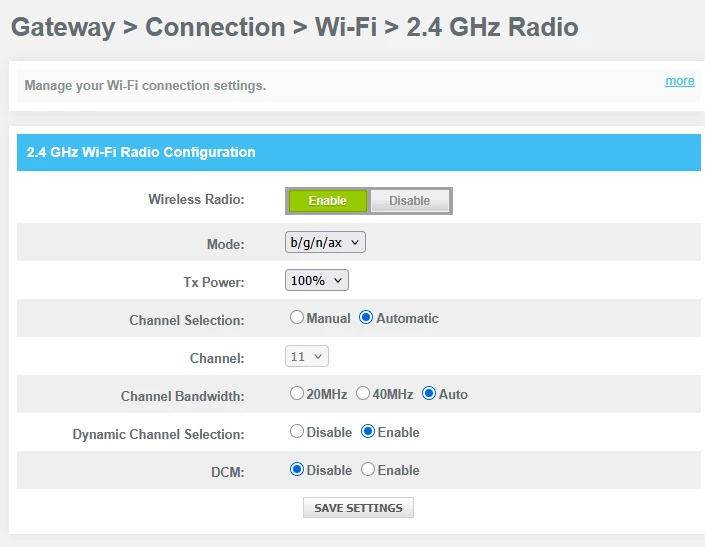
What settings besides WPA2 security mode should be changed on the Split 2.4GHz SSID (and for the 3 other Split Primary SSID's)? In Gateway>Connection>WiFi>2.4GHZ Radio (on the Primary SSID before Splitting), there are settings for Mode, Tx Power, Channel Selection, Channel, Channel Bandwidth, Dynamic Channel Selection and DCM. See Screenshot below. What would you recommend for each of those settings on the 2.4GHz SSID and the other 3 SSID's?

Your assistance is appreciated. Best wishes.


Forum|alt.badge.img+42

Most IoT devices perform best when the 2.4 GHz encryption method is set to medium. Changing the security mode is the recommended approach; however, this does not affect the complexity of the Wi-Fi password.

Apart from adjusting the security mode, no other changes are required in the 2.4 GHz radio settings.


Forum|alt.badge.img
  • Author
  • The Many
  • December 30, 2025

Thanks.

Could you please confirm that by medium encryption you mean setting security mode to the WPA2-PSK (AES) drop menu option, or let me know what if you meant something else?

Also, please address these other setting questions:

What bandwidth guidelines would you recommend for reconnecting WiFI laptops, smart TV's and smart phones (e.g., use the same bandwidth such as 5GHz for all or divide them up to try to split the traffic loads)?

Does your comment [“Additionally, enabling band steering is not mandatory...”] mean that Band Steering should be disabled for all SSID's because, once the Primary SSID is split, that automatic bandwidth selection would no be longer available?

How does that (disabling Band Steering) affect the Guest SSID? If Band Steering were left enabled (even though not available for use by the Split Primary SSID's), would it still work for the Guest SSID?

One additional point that has come up is can the SSID Broadcast for the 2.4G network dedicated to IoT devices be disabled after the initial IoT device connection has been made with a setting to save and remember on the IoT device?

Thanks for your help.  Best wishes,


plemans
Juggernaut
Forum|alt.badge.img+41
  • Juggernaut
  • December 31, 2025

I wouldn’t split the networks. One of the main benefits to wifi 7 is the bandsteering. 

What I’d do? Pickup a cheap 2.4ghz only access point. You can grab any old router off the marketplace and just use that for your IoT devices. You might even have an old router sitting in a box or know someone with one. Then you can have just the one AP with a sketchier security 


Forum|alt.badge.img
  • Author
  • The Many
  • December 31, 2025

Thanks for your good comments, plemans.

I agree - it seems absurd to dumb-down the hi-tech WiFi7 system to control a small low grade device.  ASUS has firmware that easily allows an isolated 2.4G SSID to be set up for IoT’s as noted in my link posted above.  Others allow new SSID’s to be created.

I’ve discussed your suggestion before with some security techs, but was reluctant to go that way as most techs have told me in the past to generally avoid multiple routers.  Access Points to generate bandwidths has never come up.

The Netgear items in your set up have great specs; much better RJ45 ports compared to the G54.  I use the 1G ports on the G54 for low-grade appliances such as VoiP modems, and run the 1 10G port to a 10 port QNAP 2.5G switch.

Is your Xfinity device a router or an Access Point?

If it’s a router, have you experienced IP or other conflicts?  Do you use static settings (only) on the Xfinity?

How would an AP be configured in your setup?  Does it have its own SSID settings (bandwidth, security mode, user/password, etc)?

Best wishes