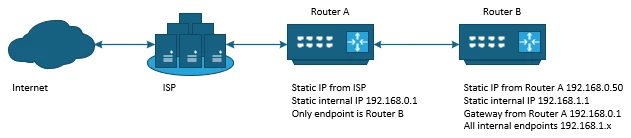
Router A (Arris TG3452A) ISP internet 192.168.0.1 No endpoints (other than Router B) connected
Router B (tp-link Archer AX11000) Internal router 192.168.1.1 All internal endpoints connected
Router B gets IP address from Router A Router B uses Router A as gateway
Other than Router A providing a static IP to Router B and Router B using Router A as the gateway, I can't see any way to add any further configuration to Router A that would allow for a NAT forwarder to work for Router B.
Would like to be able to add a port forward on Router A for an endpoint on Router B ,but Router A states IP address is invalid (because it's not in the same subnet).
Can this be accomplished? If so, how?
Thanks in advance.
Best answer by SURFboard Moderator
If both routers are connected simultaneously, it may lead to a network conflict. To avoid this, you have two options:
Use the TG as your primary router and disconnect the Tp-link.
Alternatively, you can set the TG to bridge mode. This will disable its Wi-Fi frequencies and DHCP functionality, effectively turning it into a cable modem. In this setup, only one Ethernet connection should be made to the TG connecting it to the Tp-link.. From the Tp-link., you can then distribute the remaining connections.
Please note that we do not have specific information regarding the TG model. Our suggestions were based on general troubleshooting steps.
ARRIS supports only the retail products that are available on surfboard.com but not the ISP lease products. Please contact your ISP for further assistance.
If both routers are connected simultaneously, it may lead to a network conflict. To avoid this, you have two options:
Use the TG as your primary router and disconnect the Tp-link.
Alternatively, you can set the TG to bridge mode. This will disable its Wi-Fi frequencies and DHCP functionality, effectively turning it into a cable modem. In this setup, only one Ethernet connection should be made to the TG connecting it to the Tp-link.. From the Tp-link., you can then distribute the remaining connections.
Please note that we do not have specific information regarding the TG model. Our suggestions were based on general troubleshooting steps.
ARRIS supports only the retail products that are available on surfboard.com but not the ISP lease products. Please contact your ISP for further assistance.
As stated earlier we do not have specific information regarding the TG model. Our suggestions were based on general troubleshooting steps. We apologize for the inconvenience.