




Answer

New S34 Unable to maintain connection

  • September 16, 2025
  • 5 replies
  • 276 views

Solokron
The Many
Forum|alt.badge.img

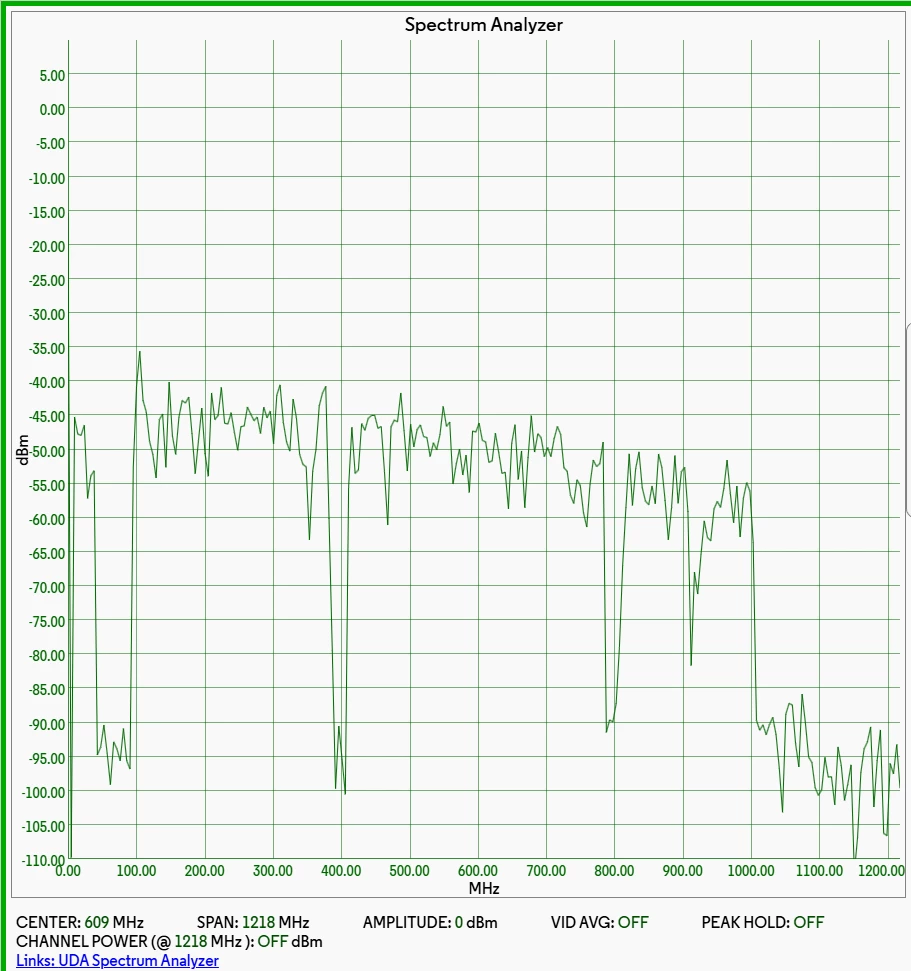
I am pretty certain I know the answer but wanted additional validation. I purchased an Arris S34 because my old Motorola MB8600 was having some issues and figured I might as well go with the latest with improved uploads. Initially the Arris S34 worked great and I was getting upload speeds of 320mbps which was impressive but would then lose connection after 30 minutes and rarely reconnect on a power reset. After dealing with Xfinity offshore level 1 tech hell for several days I had another tech come out to my house who indicated the tap box needed to be replaced. I reconnected my MB8600 and ran the Spectrum Analyzer. It's noisy and uneven. Around 400 MHz and again near 950–1000 MHz. Above 950 MHz, the signal sharply falls off to the noise floor. 

Screenshot: 

(edited personal information)


Event log:
      Time Not Established
     Critical (3)         CMSTATUS:US_Diplexer_Mode_Change:Fixed Initial, 5-42MHz.
       Time Not Established
     Critical (3)         SYNC Timing Synchronization failure - Failed to acquire QAM/QPSK symbol timing;;CM-MAC=(edited personal information) :72;CMTS-MAC=00:00:00:00:00:00;CM-QOS=1.1;CM-VER=3.1;
       Time Not Established
     Critical (3)         CMSTATUS:DS_Diplexer_Mode_Change_Ignored:TLV-21.2, 258MHz.
       Time Not Established
     Critical (3)         CMSTATUS:DS_Diplexer_Mode_Change_Ignored:TLV-21.3, 1002MHz.
       Time Not Established
     Critical (3)         CMSTATUS:US_Diplexer_Mode_Change:TLV-21.1, 5-85MHz.
       Time Not Established
     Notice (6)         Honoring MDD; IP provisioning mode = IPv6
       Time Not Established
     Critical (3)         CMSTATUS:DS_Diplexer_Mode_Change_Ignored:TLV-84.2, 108MHz.
       Time Not Established
     Critical (3)         CMSTATUS:DS_Diplexer_Mode_Change_Ignored:TLV-84.3, 1002MHz.
       09:52:36
Mon Sep 15 2025         Critical (3)         CMSTATUS:US_Diplexer_Mode_Change:TLV-84.1, 5-42MHz.
       09:52:38
Mon Sep 15 2025         Critical (3)         CMSTATUS:DS_Diplexer_Mode_Change_Ignored:TLV-21.2, 258MHz.
       09:52:38
Mon Sep 15 2025         Critical (3)         CMSTATUS:DS_Diplexer_Mode_Change_Ignored:TLV-21.3, 1002MHz.
       09:52:38
Mon Sep 15 2025         Critical (3)         CMSTATUS:US_Diplexer_Mode_Change_Ignored:TLV-21.1, 85MHz.
       09:52:41
Mon Sep 15 2025         Critical (3)         UCD invalid or channel unusable;CM-MAC=(edited personal information);CMTS-MAC=00:90:f0:4d:02:00;CM-QOS=1.1;CM-VER=3.1;
       09:52:43
Mon Sep 15 2025         Notice (6)         Honoring MDD; IP provisioning mode = IPv6
       09:52:51
Mon Sep 15 2025         Critical (3)         CMSTATUS:DS_Diplexer_Mode_Change_Ignored:TLV-84.2, 108MHz.
       09:52:51
Mon Sep 15 2025         Critical (3)         CMSTATUS:DS_Diplexer_Mode_Change_Ignored:TLV-84.3, 1002MHz.
       09:52:51
Mon Sep 15 2025         Critical (3)         CMSTATUS:US_Diplexer_Mode_Change:TLV-84.1, 5-42MHz.
       09:52:58
Mon Sep 15 2025         Notice (6)         DS profile assignment change. DS Chan ID: 32; Previous Profile: ; New Profile: 1 2 3.;CM-MAC=(edited personal information);CMTS-MAC=00:90:f0:4d:02:00;CM-QOS=1.1;CM-VER=3.1;
       09:53:07
Mon Sep 15 2025         Critical (3)         UCD invalid or channel unusable;CM-MAC=(edited personal information);CMTS-MAC=00:90:f0:4d:02:00;CM-QOS=1.1;CM-VER=3.1;


Does this all sound about right and match up? Any additional suggestions or experiences?
Best answer by SURFboard Moderator

It appears to be the connection seems to be intermittent, we recommend checking the cable signal levels within the modem. If the signal levels are out of the acceptable range, they can lead to the kind of connectivity issues you're experiencing.

When the signal levels are within the recommended range, your modem can maintain a stable, high-quality connection to the internet

Please refer to the link below for instructions on how to check your cable signal levels:

https://arris.my.salesforce-sites.com/consumers/articles/knowledge/S33-Cable-Signal-Levels

If you find that the signal levels are not within the recommended range, we suggest contacting your Internet Service Provider (ISP) to have them reviewed and adjusted as needed.

This topic has been closed for replies.

5 replies

Solokron
The Many
Forum|alt.badge.img
  • Author
  • The Many
  • September 16, 2025


Forum|alt.badge.img+42

It appears to be the connection seems to be intermittent, we recommend checking the cable signal levels within the modem. If the signal levels are out of the acceptable range, they can lead to the kind of connectivity issues you're experiencing.

When the signal levels are within the recommended range, your modem can maintain a stable, high-quality connection to the internet

Please refer to the link below for instructions on how to check your cable signal levels:

https://arris.my.salesforce-sites.com/consumers/articles/knowledge/S33-Cable-Signal-Levels

If you find that the signal levels are not within the recommended range, we suggest contacting your Internet Service Provider (ISP) to have them reviewed and adjusted as needed.


Solokron
The Many
Forum|alt.badge.img
  • Author
  • The Many
  • September 23, 2025

It appears to be the connection seems to be intermittent, we recommend checking the cable signal levels within the modem. If the signal levels are out of the acceptable range, they can lead to the kind of connectivity issues you're experiencing.

When the signal levels are within the recommended range, your modem can maintain a stable, high-quality connection to the internet

Please refer to the link below for instructions on how to check your cable signal levels:

https://arris.my.salesforce-sites.com/consumers/articles/knowledge/S33-Cable-Signal-Levels

If you find that the signal levels are not within the recommended range, we suggest contacting your Internet Service Provider (ISP) to have them reviewed and adjusted as needed.

Did I not provide that? 


Solokron
The Many
Forum|alt.badge.img
  • Author
  • The Many
  • September 25, 2025

The neighborhood network tap was replaced, which improved the situation, but the S34 still wouldn’t stay connected. It remained on an orange status for hours, even after performing a factory reset, powering it off, waiting a minute, and turning it back on. Although the modem was fully activated on the Xfinity side, it continued to either not connect, or when it would, it would crash 30 minutes later, suggesting the S34 was defective. Once it was replaced with a competitor’s modem, the connection remained stable.


Forum|alt.badge.img+42

If the S34 completely powers off meaning none of the LED lights are on and only turns back on when manually rebooted, this behavior is abnormal. We recommend trying a different power cord to rule out a possible power cord failure.

If the issue persists, please reach out to our support team by visiting www.arris.com/consumersupport.


