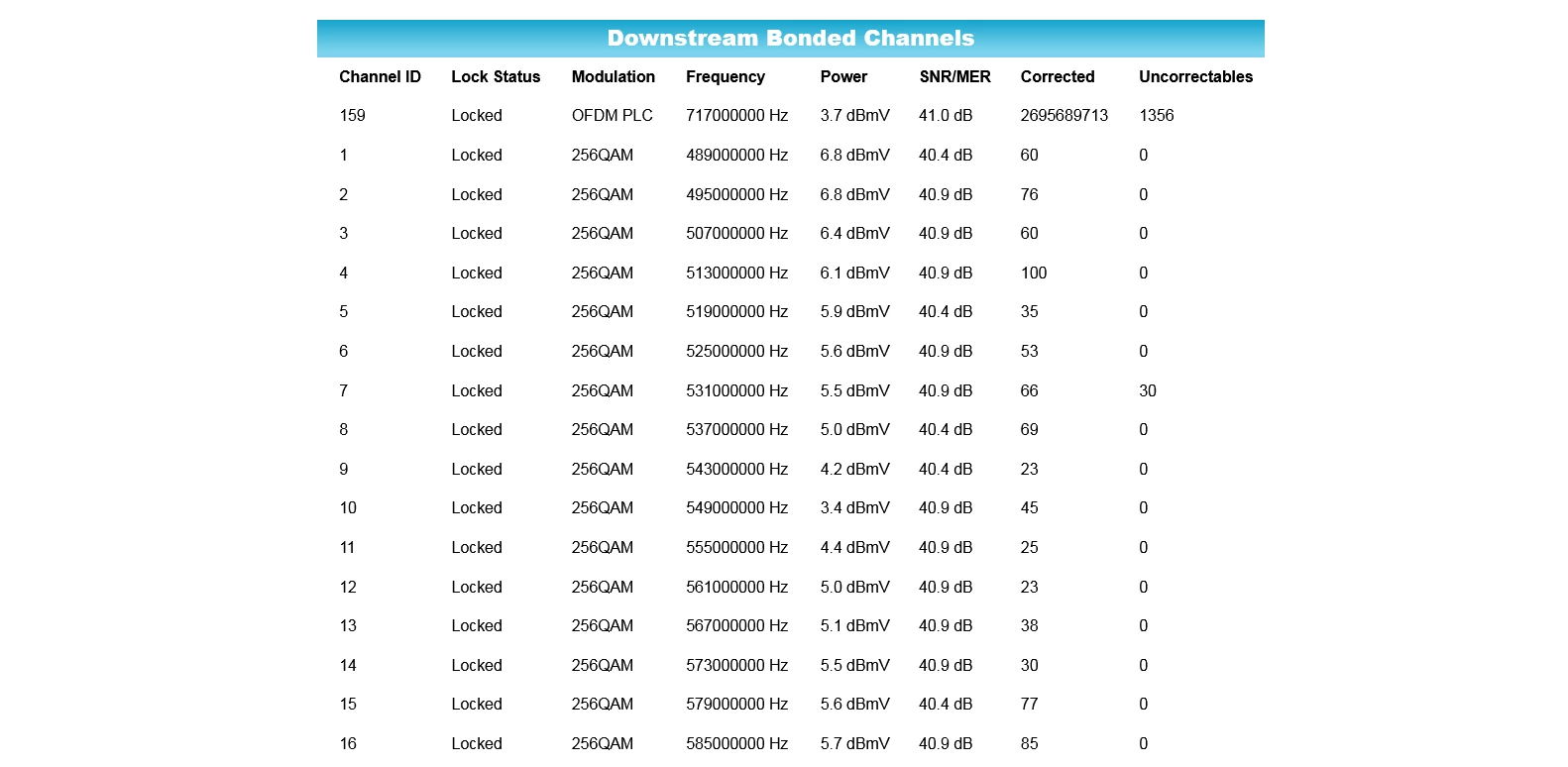
Hello everyone, does anyone have any idea what this means ? When i go onto my router webpage( optimum is the cable provider) and go on the downstream connection page, which shows many channels, the latest is it says i am on channel 159 and it show a lot of corrected and uncorrectables any ideas what this means?
Best answer by plemans
If you had a known line problem and this started afterwards, I’d check with the ISP and report it just like you did here. There’s always a chance its internal to the home and its a coincidence.
What I’d try at home
check for loose/old/bad/corroded connectors. Replace them if so.
Check for line damage, kinks, moisture, etc with the line. Those can cause issues.
if you can, move the modem to right where the coax comes into the home and direct connect it. See if you still have issues there. the reason for this is some ISP’s change for line issues internal to the home. If you connect right where it comes in, it limits the chance it internal and more of and ISP issue.
Ah, i see, thanks for the quick response, i will have to check my cable connections and lines, a tree fell on the cable lines a few houses down from me, i wonder if that is the cause? is there anyway to check the incoming cable line to see if its up to par?
Yes , hi, we had a tree come done and it took out just about all the line between two poles down the street from my house , the power and internet were out for probably 8 to ten hrs, when we finally got service back , I was having slow internet issues, so I took a look at the web page to see if anything had changed, and the only thing I noticed was was the channel and signal strength and I was wondering what that channel 159 meant and why there was so many correctable and incorrectables listed there, the speed finally went back up again, but it’s still on the channel, one member explained that it could be a cable line or a connection, if you can educate me more on this , it would be appreciated, thank you for responding,
If you had a known line problem and this started afterwards, I’d check with the ISP and report it just like you did here. There’s always a chance its internal to the home and its a coincidence.
What I’d try at home
check for loose/old/bad/corroded connectors. Replace them if so.
Check for line damage, kinks, moisture, etc with the line. Those can cause issues.
if you can, move the modem to right where the coax comes into the home and direct connect it. See if you still have issues there. the reason for this is some ISP’s change for line issues internal to the home. If you connect right where it comes in, it limits the chance it internal and more of and ISP issue.
Sounds like good advice , still checking connections around the house, speed went back up to normal speeds, topping out at 904 mbps on good days normally In the 7 to 800”s range, so the speed is fine, and router is still on that 159 channel with the many correctable and incorrectables. Just seems weird to me, probably because I don’t understand what it means, thanks for the help