A few months ago I upgraded my cable modem from a SB6183 to an S34, and soon after I started noticing intermittent dropouts, 3-4 times per day, such as during Google Meet video chats and in my SSH connections to hosts outside my network. I switched back to the SB6183 for a few months to avoid thinking about the problem, and during that time we did not notice the intermittent dropouts. But, the S34 is supposed to be a more fully-featured modem and capable of higher speeds so I switched back trying to make it work, and I’ve resolved to collect data from the modem after such an event happens.
Within the last year, I called out a Spectrum tech and got a new drop from the pole outside my house. The drop routes through a single splitter to reduce the power levels slightly and then into the cable modem.
The daily intermittent dropouts continue.
When these intermittent drops occur, I notice that I’m still able to connect to the web portal on the modem on my network, i.e. 192.168.100.1, so I’m led to believe that during these times my WiFi and internal network is fine.
A few weeks ago after such an event I was moved to call Spectrum for help again, and they reported that everything looked fine on their side and on their lines up to the modem, and they insisted that I should reach out to the manufacturer.
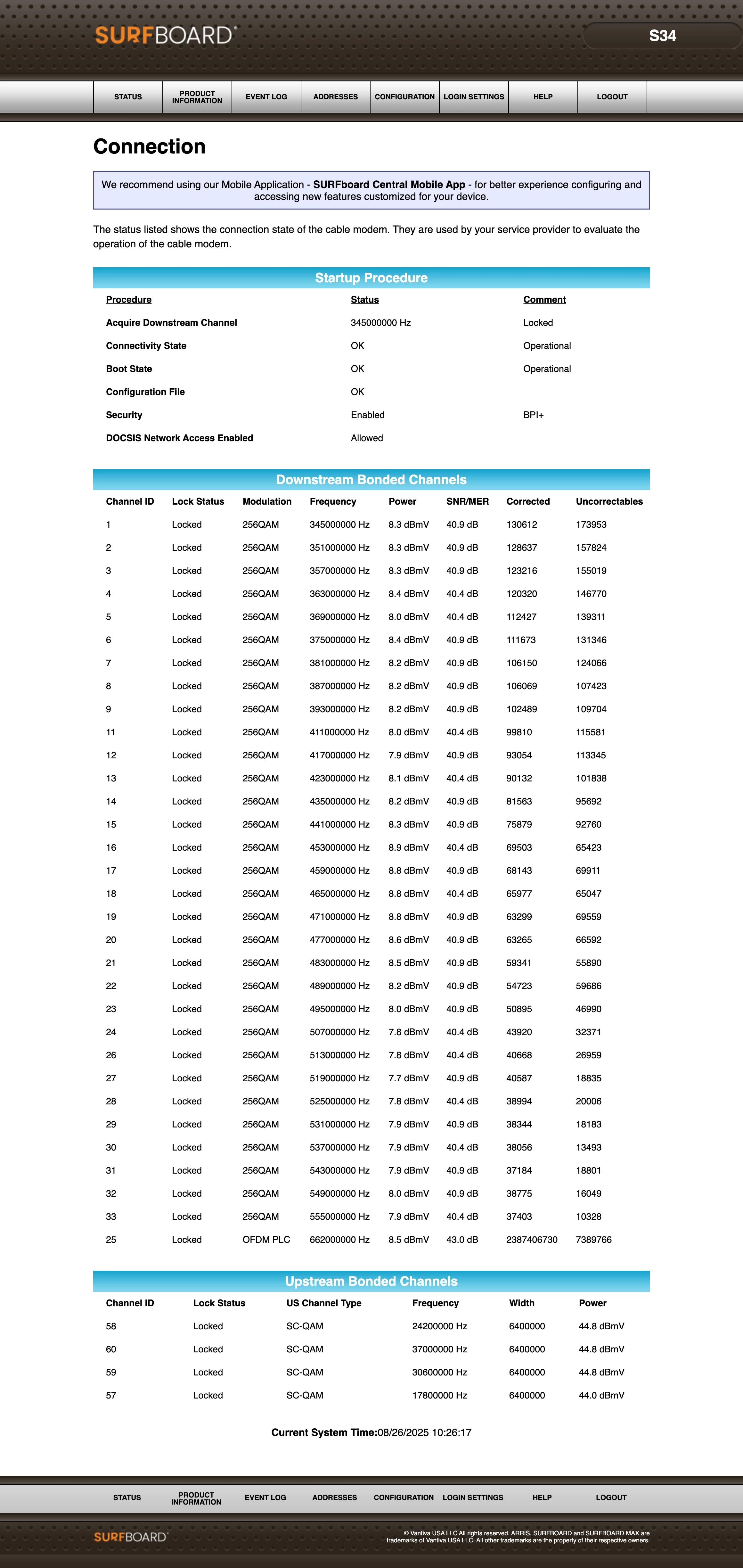
Just now I was kicked off a Google Meet call, and no device was able to reach the internet. I walked over to my neighbor’s house who also has Spectrum, and was able to use his internet just fine. Then I came back and saw that my internet was still out. I logged in to the cable modem and grabbed screenshots of the status page and event log (see attached), and then clicked reboot. After the reboot, the internet was available again to devices on my network.
This is the first time that I’ve had to actually reboot/power cycle the cable modem to get the connection to come back.
Is there any helpful information in the event log or status page that can help me figure out what’s going on and how I can get a smooth internet connection?