




Solved

S34 OFDMA Channel Missing

  • October 18, 2025
  • 2 replies
  • 34 views

knjpollard
The Many
Forum|alt.badge.img

My Arris 34 is missing the OFDMA channel. I did have it, but then it disappeared. 
 

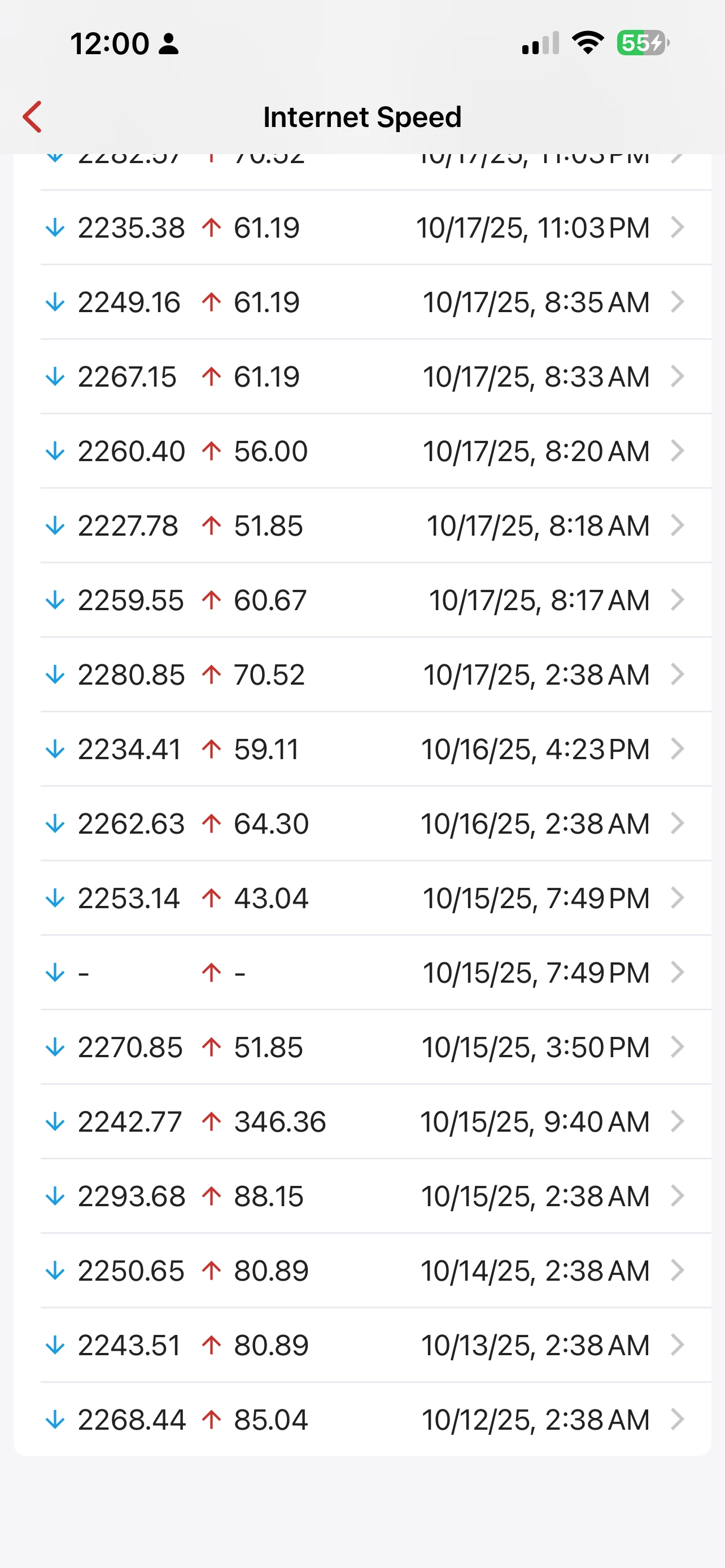
Log from my Firewalla router. See attached 10/15 upload speed good at 346mbps. That’s what is supposed to happen. On the other days you can see the upload speed hits a ceiling <85 mbps. 

Software/Firmware from Xfinity is the latest. Xfinity tech came out and put his field test modem on my line and indeed showed 2200 down and 400 up, but this S34 modem isn’t buying it. 


What can I do here?


Best answer by SURFboard Moderator

The S34 is a plug-and-play device and does not require any internal configuration. If the OFDMA channels are not appearing, it likely means your internet service provider is not currently supplying them.

The cable signal levels displayed on the interface page reflect the signals being transmitted by your Internet Service Provider (ISP).

To help isolate the issue, we recommend connecting the S34 directly to a computer using an Ethernet cable and then running a speed test.

If still the issue persists, then we recommend checking the cable signal levels within the gateway. If the signal levels are out of the acceptable range, they can lead to the kind of slow speed issues you're experiencing

Please refer to the link below for instructions on how to check your cable signal levels:

https://arris.my.salesforce-sites.com/consumers/articles/knowledge/S33-Cable-Signal-Levels

This topic has been closed for replies.

2 replies

knjpollard
The Many
Forum|alt.badge.img
  • Author
  • The Many
  • October 18, 2025

Adding to my post. The screenshot showing the OFDMA channel there is from Mar 2025, to illustrate that my problem is intermittent but mostly the OFDMA channel doesn’t lock. 
 

Also, commentary around that 10/15 log entry showing the upstream working once again only to go away. Xfinity actually came out to my neighborhood on 10/15 to do maintenance. They were at the end of my driveway with the communications box open doing work. The internet was going in and out as they worked. One of the times when it was present I was able to get that fast upload speed so you see that in the log. Later that day it was back to slow. On 10/16, Xfinity said we have to do more as the problem wasn’t resolved. They did some more but that didn’t change things for my upload speed. 


Forum|alt.badge.img+42

The S34 is a plug-and-play device and does not require any internal configuration. If the OFDMA channels are not appearing, it likely means your internet service provider is not currently supplying them.

The cable signal levels displayed on the interface page reflect the signals being transmitted by your Internet Service Provider (ISP).

To help isolate the issue, we recommend connecting the S34 directly to a computer using an Ethernet cable and then running a speed test.

If still the issue persists, then we recommend checking the cable signal levels within the gateway. If the signal levels are out of the acceptable range, they can lead to the kind of slow speed issues you're experiencing

Please refer to the link below for instructions on how to check your cable signal levels:

https://arris.my.salesforce-sites.com/consumers/articles/knowledge/S33-Cable-Signal-Levels


