



Answer

No option to turn off LEDs on SB6183

  • June 24, 2024
  • 3 replies
  • 70 views

Forum|alt.badge.img

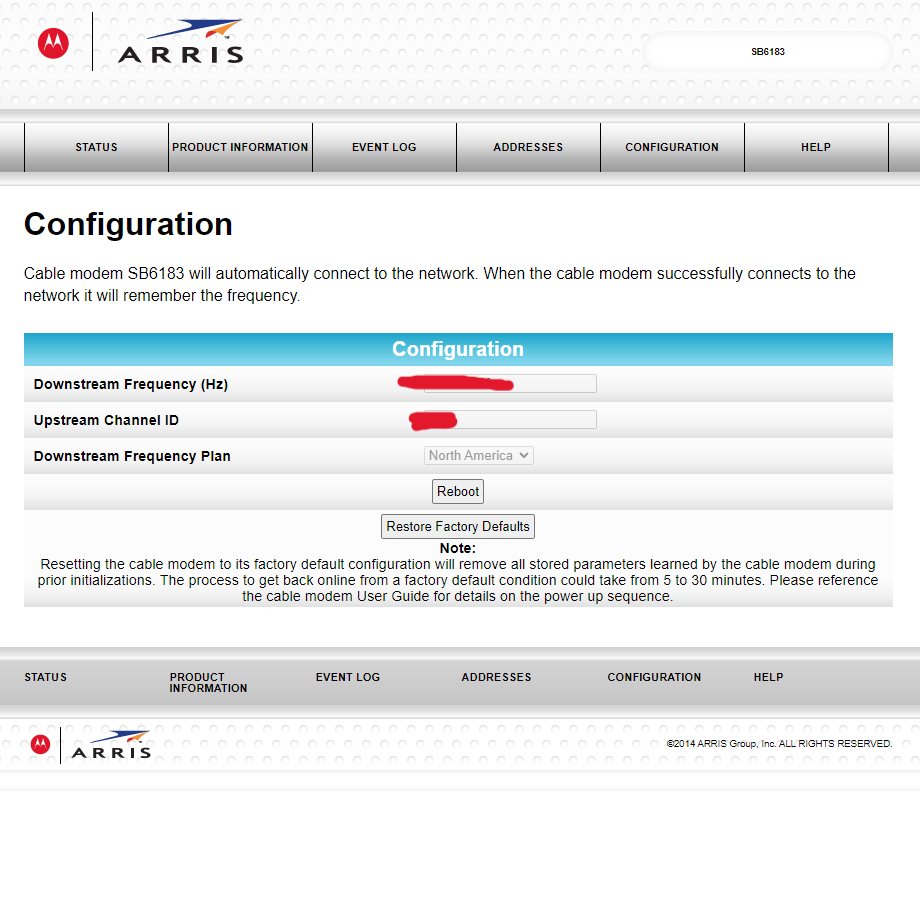
As title states, when I am in  modem GUI and I have no option in the Configuration menu to disable the LED lights on the front of the unit. Yes, I already read article to turn of the LED lights on the modem and that’s how I know it isn’t working. Any help would be appreciated.



Best answer by SURFboard Moderator

If you tried with all the possible troubleshooting steps, I would suggest visiting www.arris.com/consumersupport for further assistance.

This topic has been closed for replies.

3 replies

Forum|alt.badge.img+42

In this case we would suggest you to try the same steps on the direct connection without coax. So connect any device to the modem ethernet port to the modem LAN port then try logging in to the modem GUI and follow the steps mentioned on the article to turn off the LED lights.


Forum|alt.badge.img
  • Author
  • The Many
  • September 21, 2024

In this case we would suggest you to try the same steps on the direct connection without coax. So connect any device to the modem ethernet port to the modem LAN port then try logging in to the modem GUI and follow the steps mentioned on the article to turn off the LED lights.


Tried that, no luck unfortunately. Configuration menu stays the same as previously shown


Forum|alt.badge.img+42

If you tried with all the possible troubleshooting steps, I would suggest visiting www.arris.com/consumersupport for further assistance.

