Cox blaming Arris modem

  • March 25, 2026
  • 4 replies
  • 39 views

Forum|alt.badge.img

A "high level" tech that came to service my internet completely hand-waved away the errors in my modem (this was after I put in an FCC complaint for TLV-11 config file rejections). The tech came out on March 22nd. He stated that the 2nd LAN port on my modem didn't work; which is a complete fabrication. I am able to view error logs directly through this port. He tried to tell me that the error logs I'm seeing are because the port doesn't work, but obviously it works or I wouldn’t be able to access the error logs. He just tried to place blame on the 3rd party modem. I know that this is on the CMTS or node side.

They continually try to pin the blame on the 3rd party modem manufacturer--which is both an approved appliance on their site, and they are in charge of any firmware updates on this router (this is the whole point for the DOCSIS standard).

I wanted to contact Arris directly to have them say that it isn’t on their side of things…

(Edited private information) 

I continually have latency and ping issues, as well as, periods of 100Mbps speed (non-peak--early am). I’m using cat6e cables.


4 replies

Forum|alt.badge.img+42

The errors shown in the event logs can only be resolved by your internet service provider, as they are related to the internet service itself.

To begin isolating the issue, please connect a computer directly to the modem using an Ethernet cable and monitor the connection to see if there is latency. This will help determine whether the problem lies with the modem, the router, or elsewhere.

If the issue persists even with a direct connection, we can proceed with checking the cable signal levels within the modem . If the signal levels are out of the acceptable range, they can lead to the kind of connectivity issues you're experiencing.

When the signal levels are within the recommended range, your modem can maintain a stable, high-quality connection to the internet

Please refer to the link below for instructions on how to check your cable signal levels:

https://arris.my.salesforce-sites.com/consumers/articles/knowledge/SB8200-Cable-Signal-Levels

If you find that the signal levels are not within the recommended range, we suggest contacting your Internet Service Provider (ISP) to have them reviewed and adjusted as needed.

For further assistance, we have reached out to you via private message.


Forum|alt.badge.img
  • Author
  • The Many
  • March 26, 2026

 Hello,

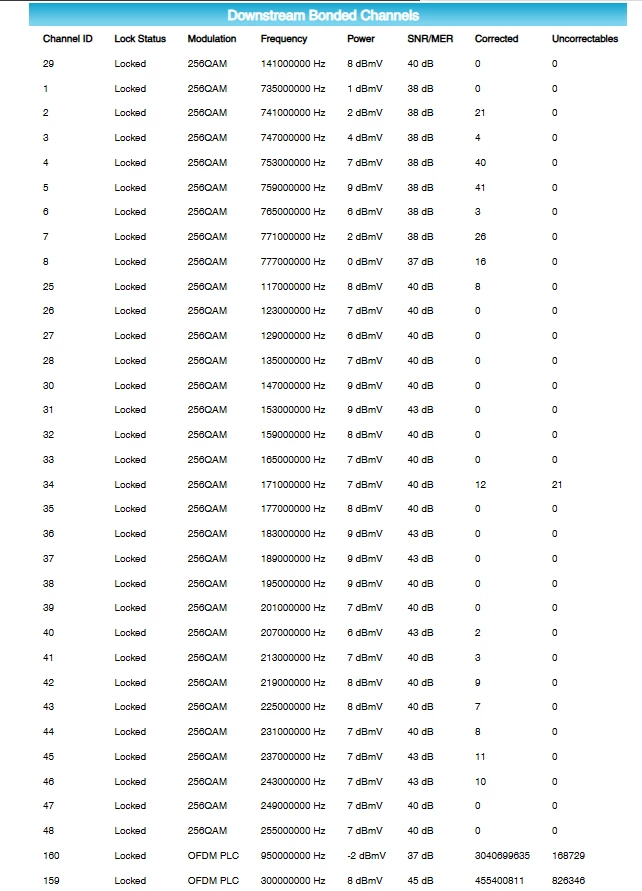
Thank you for your help. I took a look at my power/SNR levels. I don’t really see anything out of place except for a lot of correctables/uncorrectables on ODFM channel 159, 160, and to a lesser extent channel 34.

826,346 uncorrectables on channel 159. 168,729 on ch 160. Over 3 million correctables on channel 160. Channel 34 has 21 uncorrectables.


Forum|alt.badge.img
  • Author
  • The Many
  • March 26, 2026

If it makes any difference, the model of the modem is sb8200v3.


Forum|alt.badge.img+42

When creating this topic, you did mention the model number in the category. Thank you again for confirming it.

Correctable and uncorrectable errors are related to the internet service itself, and users have no control over them.

Correctable errors are transmission errors that are automatically corrected by the internet service provider when they send a Forward Error Correction.