Solved

Surfboard Central App not showing the correct device / Unable to proceed with login

  • June 25, 2023
  • 2 replies
  • 463 views

Forum|alt.badge.img

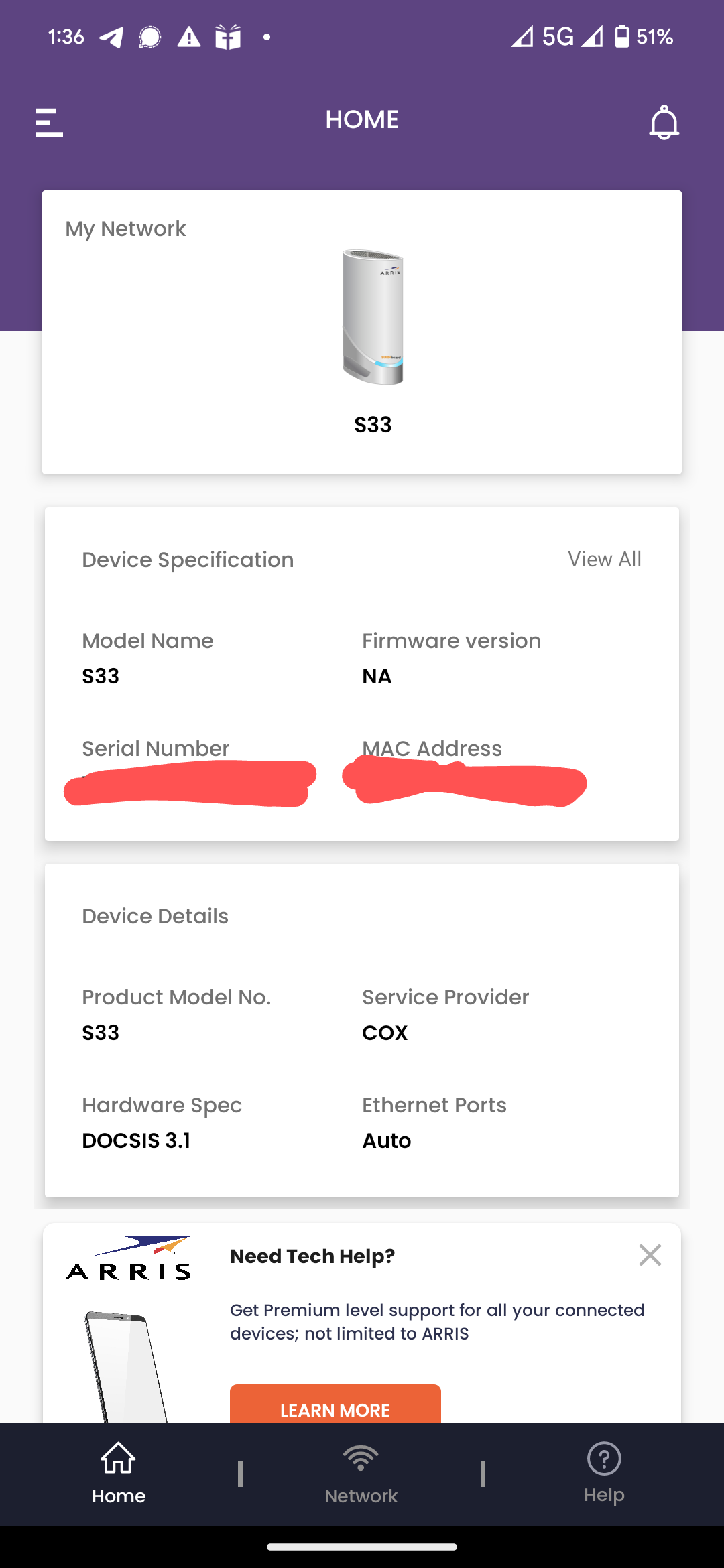
I just downloaded the app, to try and run a speedtest, but my app is showing the wrong device connected.

I have a SBG8300, black modem/router. I set this up via the web portal, but when I logged into the app, it is showing it as an S33 white modem only.

This is preventing me from doing a wifi speedtest.

Anyone else having this issue, or know why it's happening?

Best answer by SURFboard Moderator

Hello spitfir23,

Make sure you are using the below mentioned link to access the Surfboard Central App:

http://arris.force.com/consumers/articles/General_FAQs/SURFboard-Central-Wi-Fi-Cable-Modem-Setup

Let us know if this helps.

This topic has been closed for replies.

2 replies

Forum|alt.badge.img+42

Hello spitfir23,

Make sure you are using the below mentioned link to access the Surfboard Central App:

http://arris.force.com/consumers/articles/General_FAQs/SURFboard-Central-Wi-Fi-Cable-Modem-Setup

Let us know if this helps.


Forum|alt.badge.img
  • Author
  • The Many
  • July 3, 2023

Yes that is the app in question that is showing the S33. Picture attached.