Answer

Arris support down

  • August 27, 2025
  • 10 replies
  • 120 views

Forum|alt.badge.img+1

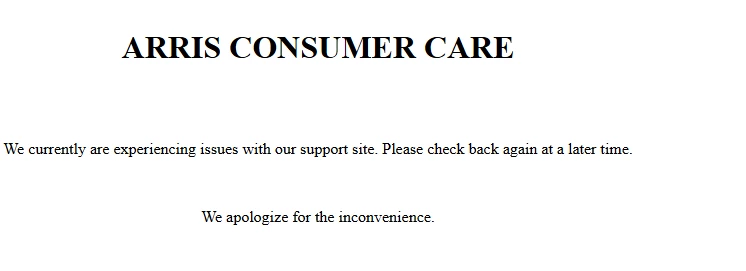
There are two links provided in an answer on how to reset password.  Neither one works.  The site is down and has been every time I have tried.  Is there a new link somewhere?  Here is the link provided:https://arris.my.salesforce-sites.com/consumers/articles/General_FAQs/SVG2482AC-Factory-Reset

Best answer by SURFboard Moderator

You can find the default WiFi network name (SSID) printed on the side panel of the G36 device.

We would recommend checking the cable signal levels within the gateway. If the signal levels are out of the acceptable range, they can lead to the kind of slow issues you're experiencing.

When the signal levels are within the recommended range, your gateway can maintain a stable, high-quality connection to the internet. 

Please refer to the link below for instructions on how to check your cable signal levels:

https://arris.my.salesforce-sites.com/consumers/articles/knowledge/SVG2482AC-Cable-Signal-Levels

The cable signal levels displayed on the interface page reflect the signals being transmitted by your Internet Service Provider (ISP).

If you notice that these signal levels are outside the recommended range, we suggest contacting your ISP to have them reviewed and adjusted accordingly.

While ISPs may have their own approved signal ranges, for this gateway to function properly, the signal levels must align with the acceptable values outlined in the reference article provided.


This topic has been closed for replies.

10 replies

Forum|alt.badge.img+42

Could you please provide the model number of your product and share more details about the issue you're experiencing? This will help us offer you accurate support.


Forum|alt.badge.img+1
  • Author
  • The Many
  • August 28, 2025

Model is SVG2482AC, which has nothing to do with the fact that your support page seems to be defunct.  I have lost user name and password (of course I changed it!) and want to see if I can find another channel for my 2.4 wi-fi.  Download speed is 14 sitting right next to the modem, while 5.0 speed is near 400. The 2.4 was running around 32. Someone else had asked how to reset their password and was given 2 links regarding a factory reset.  When you click on the link you get this:

Would be nice to be able to click something to reset password without having to do a factory reset!


Forum|alt.badge.img+42

Could you please confirm the speed plan you are currently subscribed to with your internet service provider?

Also, have you tried connecting a device using an Ethernet cable to check the internet speed? Unlike Wi-Fi, Ethernet connections are not affected by interference, which helps confirm whether the gateway is delivering a stable connection.

If you've forgotten the login password for the web interface, you may need to perform a factory reset by hold down the Reset button for at least 15 seconds and release it. The SVG2482AC will then reboot, once the Wi-Fi LEDs flash the SVG2482AC has finished rebooting and be will be configured with the default settings. 

Note: After performing a factory reset, you will temporarily lose your internet connection. To restore it, you’ll need to reconfigure the default Wi-Fi network name (SSID) and password.


Forum|alt.badge.img+1
  • Author
  • The Many
  • August 31, 2025

My internet is 1.0 Gig.  Ethernet to the PC I am using right now is 657. It doesn’t make any difference if I am using my tablet or my phone on the 2.4. I am wondering if the channel I have the 2.4 on is just busy these days. The slow down started a month ago. I do have a printout for using the Gateway Web Manager I printed out, so I assume it will walk me through again.  What I don’t see is the factory SSID.  Will that get picked up automatically? There are MAC numbers and stuff on the bottom of the modem, but no SSID.


Thanks.


Forum|alt.badge.img+42

You can find the default WiFi network name (SSID) printed on the side panel of the G36 device.

We would recommend checking the cable signal levels within the gateway. If the signal levels are out of the acceptable range, they can lead to the kind of slow issues you're experiencing.

When the signal levels are within the recommended range, your gateway can maintain a stable, high-quality connection to the internet. 

Please refer to the link below for instructions on how to check your cable signal levels:

https://arris.my.salesforce-sites.com/consumers/articles/knowledge/SVG2482AC-Cable-Signal-Levels

The cable signal levels displayed on the interface page reflect the signals being transmitted by your Internet Service Provider (ISP).

If you notice that these signal levels are outside the recommended range, we suggest contacting your ISP to have them reviewed and adjusted accordingly.

While ISPs may have their own approved signal ranges, for this gateway to function properly, the signal levels must align with the acceptable values outlined in the reference article provided.


Forum|alt.badge.img+1
  • Author
  • The Many
  • September 8, 2025

Thank you.  It obviously never occurred to me to look there.  I know my internet speed is good on the ethernet and on the wi-fi 5.0.  It is the 2.4 that is horrible. There are currently 6 devices using the 5.0 (not all at once, that is usually 4 or 5).  I have no idea how many can use the same wi-fi at once before degrading the speed (or does that happen)?


Forum|alt.badge.img+42

When using the 2.4 GHz Wi-Fi frequency, you typically receive only about one-fourth of your maximum internet speed, and actual performance can vary depending on the device's capabilities. While 2.4 GHz offers broader coverage and better range, it delivers lower speeds compared to 5 GHz.

On the other hand, the 5 GHz frequency provides higher speeds, but with reduced coverage, making it ideal for short-range, high-bandwidth activities.


Forum|alt.badge.img+1
  • Author
  • The Many
  • September 9, 2025

Thanks for the info. I have 1.0 Gig. My 2.4 on a good day sitting next to the router is 27 to 30! It used to do much better. That is why I thought I should try changing channels. The same device gets around 250 two rooms away on the 5.0!


Forum|alt.badge.img+42

If your Wi-Fi-connected devices are experiencing slower speeds compared to wired connections, we recommend placing the gateway at a higher elevation and in an open area to improve signal strength.

Note: Wi-Fi performance can vary between devices depending on their hardware capabilities.

If the issue persists, consider changing the Wi-Fi channel. For detailed instructions, please refer to the link below:

https://arris.my.salesforce-sites.com/consumers/articles/knowledge/SVG2482AC-Changing-the-Wireless-Channel


Forum|alt.badge.img+1
  • Author
  • The Many
  • September 12, 2025

Since a device place right next to it is getting the slow speed, I doubt elevating it will help! I will change the channel if I get brave enough to do a factory reset, Lousy way to change a password.  I know, I should have it written down in a place I remember!