Answer

New T25 Specs versus the old T25?

  • October 11, 2025
  • 2 replies
  • 41 views

Forum|alt.badge.img

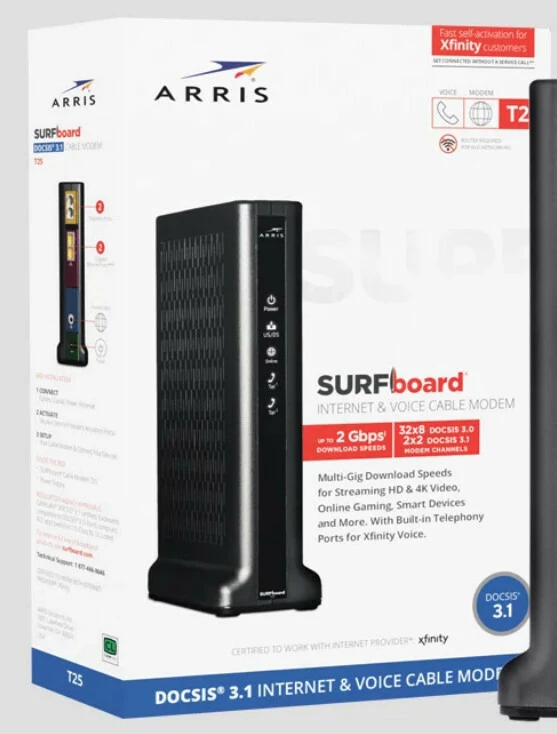
I currently have an old SurfBoard T25 which I use on Xfinity and is perhaps 8-10 years old and it’s a DOCSIS 3.0 modem has a theoretical max speed of 1gbps, recently due to changes in my plan I can get speeds up to 2gbps but I need a new modem with telephony to get it. Now apparently there is a new SurfBoard T25 which is DOCSIS 3.1 capable but the website description seems to contradict itself, this is the picture of the box:

Which seems to claim that the max download speed is 2gbps, however on the product page here:

Claims “Best for internet plans with up to 800 Mbps” which seems to conflict with what the actual box says. So what is that actual truth here and will this modem achieve up to 2Gbps download speeds on Xfinity?

Best answer by SURFboard Moderator

The T25 modem has never been launched with DOCSIS 3.0. The model released in 2019 supports DOCSIS 3.1 only.

Please double-check the configuration settings. Even though the T25 is DOCSIS 3.1 compatible, it’s possible that your Internet Service Provider (ISP) is not transmitting DOCSIS 3.1 signals.

According to Xfinity, the T25 is approved for speeds up to 949 Mbps, which is why it’s often labeled as “Best for internet plans with up to 800 Mbps.”

You can refer to the link below for details on speed plan compatibility under Xfinity.

https://assets.xfinity.com/assets/dotcom/projects/cix-4997_compatible-devices/2025.03.25%20Full%20List%20of%20Compatible%20Devices.pdf

Also, the modem has two Ethernet ports on the back, each supporting speeds up to 1 Gbps.

The T25 is a standalone cable modem and does not include a built-in DHCP server. As a result, when your internet service provider (ISP) activates the modem, it typically assigns only one public IP address, which supports a single internet connection.

If you wish to use both Ethernet ports on the T25 simultaneously, you would need to contact your ISP and request the activation of a second public IP address. However, please note that not all ISPs offer multiple public IP addresses for residential customers.

Therefore, if both Ethernet ports on the modem are activated, you can use them simultaneously. Each port supports speeds up to 1 Gbps, allowing for a combined throughput of up to 2 Gbps.

Please refer to the link below for more information on how Ethernet ports function.

https://arris.my.salesforce-sites.com/consumers/articles/knowledge/T25-Ethernet-Ports

This topic has been closed for replies.

2 replies

Forum|alt.badge.img+42

The T25 modem has never been launched with DOCSIS 3.0. The model released in 2019 supports DOCSIS 3.1 only.

Please double-check the configuration settings. Even though the T25 is DOCSIS 3.1 compatible, it’s possible that your Internet Service Provider (ISP) is not transmitting DOCSIS 3.1 signals.

According to Xfinity, the T25 is approved for speeds up to 949 Mbps, which is why it’s often labeled as “Best for internet plans with up to 800 Mbps.”

You can refer to the link below for details on speed plan compatibility under Xfinity.

https://assets.xfinity.com/assets/dotcom/projects/cix-4997_compatible-devices/2025.03.25%20Full%20List%20of%20Compatible%20Devices.pdf

Also, the modem has two Ethernet ports on the back, each supporting speeds up to 1 Gbps.

The T25 is a standalone cable modem and does not include a built-in DHCP server. As a result, when your internet service provider (ISP) activates the modem, it typically assigns only one public IP address, which supports a single internet connection.

If you wish to use both Ethernet ports on the T25 simultaneously, you would need to contact your ISP and request the activation of a second public IP address. However, please note that not all ISPs offer multiple public IP addresses for residential customers.

Therefore, if both Ethernet ports on the modem are activated, you can use them simultaneously. Each port supports speeds up to 1 Gbps, allowing for a combined throughput of up to 2 Gbps.

Please refer to the link below for more information on how Ethernet ports function.

https://arris.my.salesforce-sites.com/consumers/articles/knowledge/T25-Ethernet-Ports


plemans
Juggernaut
Forum|alt.badge.img+41
  • Juggernaut
  • October 17, 2025

The other question, even if you have a modem that supports 2 gig speeds (like the S34 from arris or the Netgear CM3000), do you have a router with multigig capability? Its a bit pointless to upgrade the modem if the router doesn’t support the increased speeds. 

What router do you have?