
Question

Change password in the app

  • January 12, 2026
  • 10 replies
  • 98 views

Forum|alt.badge.img+1

I have a brand new G36, which I’ve finally managed to get it fully set up and working, and I want to change the password.

Going through the web interface, it tells me to change the password in the app ( “WARNING: To keep your account password in sync, it is recommended to update it using the SURFboard® App rather than changing it here.” ). But according to this post you can’t change the password in the app.

So how do I change the password in the app?

10 replies

Forum|alt.badge.img+42

If you are referring to changing the Wi-Fi password

You can change the Wi-Fi credentials in two ways:

  1. Through the Surfboard Central mobile app (if you have it set up).
  2. Via the web interface.

Please refer to the link below for instructions on changing Wi-Fi credentials using the Surfboard Central app.

https://arris.my.salesforce-sites.com/consumers/articles/knowledge/SURFboard-Central-Changing-the-Wi-Fi-Name-Password

The next link provides guidance on how to update Wi-Fi credentials through the web interface.

https://arris.my.salesforce-sites.com/consumers/articles/knowledge/G34-G36-Changing-the-Wi-Fi-Name-and-Password


Forum|alt.badge.img+1
  • Author
  • The Many
  • January 14, 2026

I’m asking about changing the admin password, not the WiFi password.


Forum|alt.badge.img+42

If you have the Surfboard Central app set up, you cannot change the password for the admin through the web interface or through the surfboard central app. This is because once the app is configured, it syncs with the web interface, ensuring that any changes made in the app are automatically reflected there.


Forum|alt.badge.img+1
  • Author
  • The Many
  • January 15, 2026

Who thought that it was a good idea to inhibit changing the password by telling users to change it in the app when you can’t change it in the app.


Forum|alt.badge.img+42

We apologize for the inconvenience. As mentioned earlier, the admin credentials for the web interface cannot be changed once the app is set up. However, you can still update your Wi-Fi credentials, adjust other settings, and monitor the connection while you are on the network.


Forum|alt.badge.img+1
  • Author
  • The Many
  • January 16, 2026

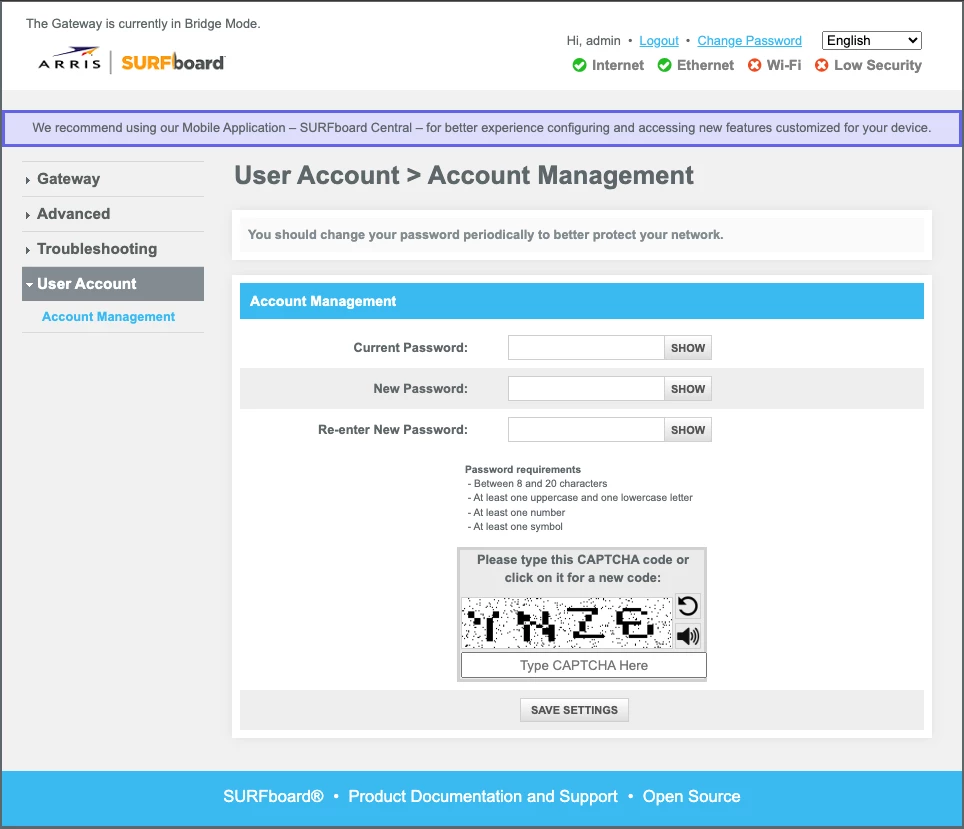
Then how am I changing my password in the web page?


Forum|alt.badge.img+42

Then how am I changing my password in the web page?


In the image you shared, I can see that your gateway is in bridge mode, and the mobile app hasn’t been set up. I can tell because the login username displayed is “admin”, which only appears when the web interface is configured without using the app.

If the app had been set up, the login username would instead be the email address you used during the app setup. That’s why you’re currently able to change the web interface login credentials you’re accessing it with the default admin username and the password you customized.

Also, when the device is in bridge mode, the app cannot be set up because the Wi‑Fi network will not broadcast, and the G36 will function purely as a cable modem.


Forum|alt.badge.img+1
  • Author
  • The Many
  • January 16, 2026

The mobile app has been set up because you can’t use the modem without it. It is a required part of the set up to get the modem running.

I set it to bridge mode because the so called security features are so terrible that they made it an all or nothing proposition, and it also creates all sorts of problems with having a double NAT.

Using these modems shouldn’t be the major pain in the backside that they are.


Forum|alt.badge.img+42

You’re correct about one thing: you can use the Surfboard Central app to set up the gateway. The app provides guided instructions for the initial setup, and once everything is configured, it also allows you to manage the device such as changing Wi‑Fi credentials and adjusting other gateway settings.

However, setting up the app is not mandatory. As we mentioned earlier:

“If the app had been set up, the login username would be the email address used during the app setup. But since you’re logging in with the default username ‘admin’, this indicates that the app is no longer linked to your gateway either because it was never fully set up or because a factory reset was performed, which breaks the sync with the app. That’s why you’re currently able to change the web interface login credentials using the default ‘admin’ username along with the password you customized.”


Forum|alt.badge.img+1
  • Author
  • The Many
  • January 19, 2026

My fresh out of the box experience required that I use the app to set up the modem as it blocked connections from my computer. There is no way I could have set it up without using the app.